
Tubekeep
Sort your YouTube Watch Later, organize subscriptions.
A Watch Later that only goes up is not a queue, and YouTube offers no way down: no sorting, no multi-select, one three-dot menu at a time. Tubekeep reads it into the browser and makes it workable — sorted by length, by age or by channel and in either direction, cleared or filed away in batches, with the videos that have gone dead found and listed. Your playlists and subscriptions come in with it, so one search covers the whole library and one folder tree tidies the flat list of channels. Your own lists are read through the YouTube tab you are already signed in to — they are yours, so it has to be you — and the index stays on your machine.
It's on the Chrome Web Store. The free tier is the whole tool and its library needs no account; the paid tier is bought once, if you want it.
- Price
- Account
- Chrome permissions
- Leaves your browser
- Surfaces
- Policy updated
How it works
It reads your queue in from the tab you are already in
Open YouTube signed in as you normally are, and the extension walks Watch Later into the browser in the background — along with every playlist and every channel you subscribe to. There is no Google sign-in to grant, no API key and no separate account: it works inside your own session, which is also the only way anything can reach Watch Later at all.
You sort it into piles you can actually act on
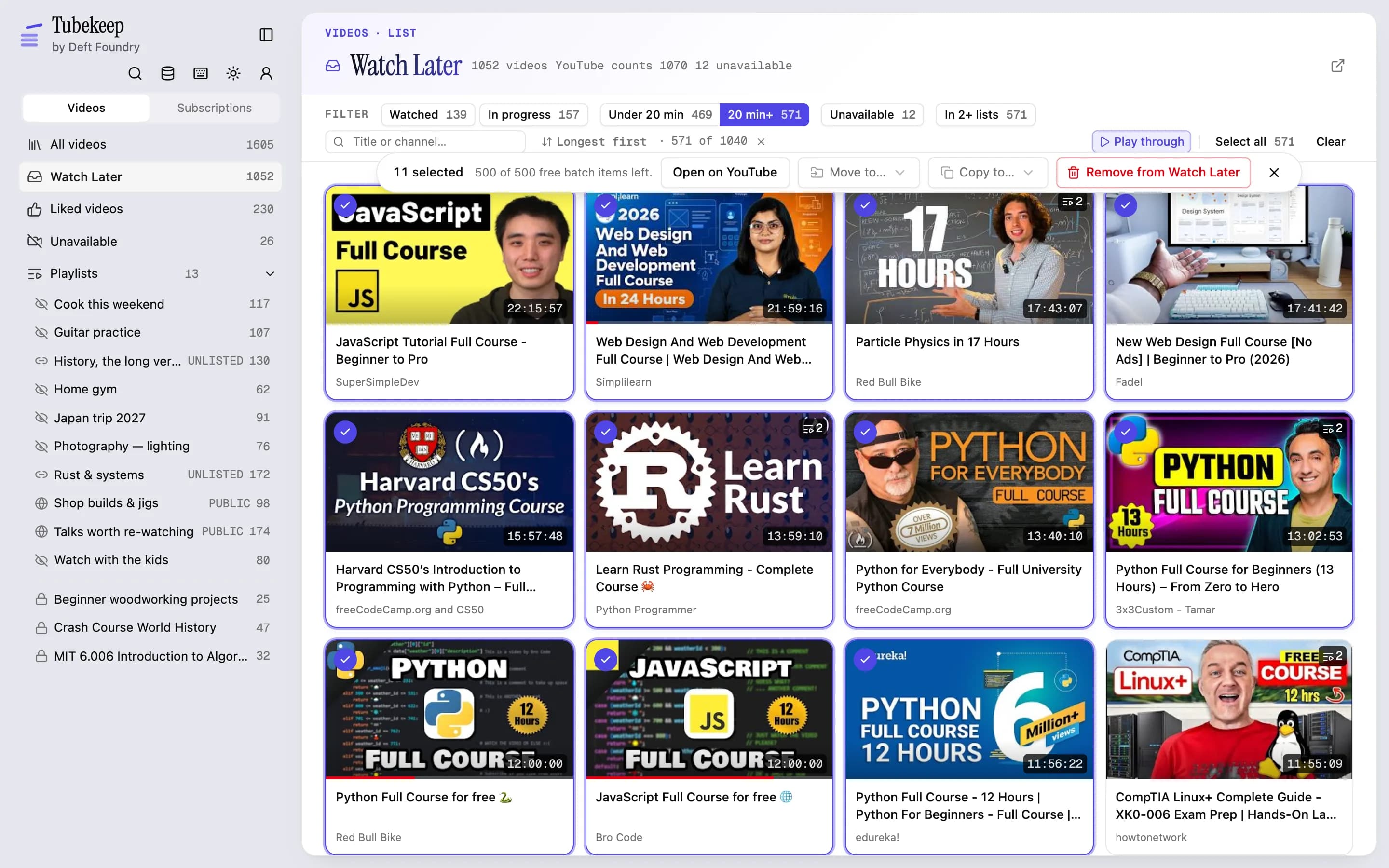
A four-figure queue is not one problem. Sort it by how long each video is, by how long it has sat there, or by whose it is — then take the long ones, the ancient ones, or the ones that have gone dead, in one gesture rather than a hundred. Playlists, subscriptions and the folders you file them into work the same way.
It carries the batch back, at a pace YouTube accepts
Remove the batch, move it into a playlist that means something, or unsubscribe from all of it. Every write happens in your own session, paced, and the local library only changes once YouTube has confirmed it. It tells you what it did, it stops and says so if the site starts refusing, and the whole batch undoes in a click.
What it does
All of this is the free tier. No account needed for any of it.
- Reads Watch Later, every playlist, your likes and your subscriptions into the browser, through the YouTube tab you are already in — no sign-in, no API key
- Sorts any list by length, by age, by channel or by when you saved it, either direction — locally, so YouTube's own order is never touched
- Narrows it to one pile first: watched, in progress, under 20 min, 20 min+, unavailable, in 2+ lists, in no list — each with its own count
- Acts on the pile in a batch — remove, move, copy, un-like, unsubscribe, set the notification bell. First 500 items free; one at a time always free
- Selects by click, by shift-range, by a box dragged across the grid, or by taking everything the filter left in one press
- A box at the head of that filter row takes a word from the title or the channel, and combines with whichever button is pressed — “watched, and about Rust” is one question
- Marks every video sitting in more than one of your lists and names them, so you can drop one copy — or clear a list of everything you had already filed elsewhere
- Runs every batch at the pace YouTube accepts, changes the local library only after YouTube confirms each write, stops and says so if the site starts refusing, and undoes in one click for 30 days
- Plays inside the workbench — a panel over the grid you drag to resize, or filling the pane, the window or the screen — so deciding about one video never costs you the grid
- Walks the pile with Play through: the videos the filter left, in the order on screen or shuffled, with the button under the player turned into remove-and-continue. Nothing recommended, and no autoplay past the end
- Opens any channel you subscribe to as its hundred newest uploads, read live from YouTube without your account — filter them, play them, save the keepers. Nothing joins your library unless you save it
- Finds what has rotted: the deleted and private videos sitting in your lists, grouped by the list each one is in and clearable in a batch
- Searches the whole library from anywhere with ⌘K — lists, folders, channels and saved videos, each under its own heading, every video naming the lists it is sitting in
- Puts the library in a side panel beside YouTube itself — step through your saved lists with the same filters, or work the subscription tree: new folder, file a channel, unsubscribe, without leaving the page
- Groups channels into folders you name and nest, in batches from the workbench or one at a time from the panel. Deleting a folder unfiles its channels and never unsubscribes from anything
- Manages the lists themselves: create, rename, make public, unlisted or private, delete your own — or drop one you saved from someone else out of your library
- Follows what you do on YouTube in this browser — save, unsave, like, subscribe, unsubscribe, rename — and is in step within seconds, with no re-read
- Backs the whole index up to one JSON file, and imports it on another machine
- Nothing is uploaded — the index lives in your browser's own storage and never touches a server of ours. The AI filing is the one exception: it is opt-in, and it sends channel names, not your library
- No account needed for the library — signing in unlocks the one AI feature, filing subscriptions into folders, and its first 200 are free
Who it's for
Install it if
- Your Watch Later is in four figures, you stopped opening it some time around the third, and removing videos one at a time is not a plan.
- You use playlists as a filing system, and YouTube's editor makes you move videos one at a time.
- You have watched a playlist you curated for years quietly fill up with deleted and private videos.
- You subscribe to a few hundred channels and the subscriptions feed has become one undifferentiated firehose.
- You want the index on your own machine rather than in someone's cloud, and you would rather not hand a third party your Google account to get it.
Skip it if
- You want to download the videos. This organises lists; it never touches the media, and it never will.
- You want a better algorithm. It arranges what you already subscribed to and recommends nothing — there is no feed here.
- You want it on your phone or inside the YouTube app. It is a desktop Chrome extension, and the index lives in one browser profile.
- You want your folders to show up inside YouTube itself. They cannot — see what it can't do, below.
What leaves your browser
The whole shelf is local-first, so this is the same figure on every sheet: what the extension holds, the line at the edge of your browser, and everything that gets across it.
Inside your browser
- Every channel you subscribe to, every playlist, everything in Watch Later and everything you liked
- The folders you build, and which channels you filed where
- Video titles, ids and durations, so a queue can be sorted without asking anyone
- How far a read has got, and the changes still queued, so either can be resumed
- Every search you type, and every result it gives back
- How many batch items you have used against the free allowance
- Your name, email, avatar and plan — only if you chose to sign in
5 things cross
Leaves your browser
- The names in a batch the AI is filing
- Only if you use the AI subscription filing, and only for the batch in hand: channel names, @handles and a short hint made from each channel's description and a few titles you already saved from it — plus the names of folders you already have. One further call at the end sends the folder names it just built, with how many channels went into each and a few of their names, to decide which belong together under a parent. No channel id and no folder id crosses — the server answers by position in the batch, so it cannot reconstruct whose library it is looking at.
- Requests for thumbnails and avatars
- They are Google's own images, so a window showing your lists asks Google's image servers for them — the same request the YouTube page beside it is already making. Which images those are says what is in your library. Reading your own lists and carrying your batches back happen inside your own YouTube tab, so YouTube sees those the way it sees you using the site.
- The id of a video you pressed play on
- Only when you press play, and only that one id. YouTube's embedded player refuses to run inside an extension page at all, so the player is loaded through a small page on our own site — which receives the id, loads YouTube's player for it, and reports back one thing: whether it plays. From there your browser talks to YouTube the way it would on the site, advertising included. Nothing else about your library crosses, and nothing crosses until you press play.
- The id of a channel you opened — or of a video you just saved
- Only when you open one of your channels to see who they are and what they post, and only that channel's id. A channel's list of videos and its public profile page are both public, so these requests deliberately carry no cookies, no sign-in and no account — it is the one thing here YouTube cannot attach to you, and it is also why the pane needs no YouTube tab open. What comes back is shown to you and kept nowhere: nothing enters your library from it unless you save something. The same anonymous route names a video you have just added on YouTube: one public request carrying only that video id, so the new row can show its title before the next read.
- A check on whether you are signed in, and which extension you came from
- One request, to draw the account row and to know whether the AI filing is open to you. It carries your session cookie and nothing about your library. And when you press something here that opens one of our pages, the link says which extension you pressed it from — one word, so we can tell whether people reach the site through an extension or find it on their own. If that visit is where you create an account, that word is kept on the account; if you never sign in, the check answers no and nothing follows.
The exact version, clause by clause, is the privacy policy.
What it costs
$19once. No subscription — and buying this one never charges you for, or unlocks, anything else on the shelf.
- Batch without a ceiling — every remove, move, copy, un-like, unsubscribe, bell change and dead-link clear, past the free 500, for as many as your library holds
- AI subscription filing past the free 200, the pass that groups topics under parents included — fair use 20,000 a month, enough to refile a large library many times over
14-day refund on your first payment — no questions asked. Ask from Support.
See both tiersWhat it can't do
The boundaries worth knowing before you install, rather than after.
- A big batch takes the time it takes
- There is no API behind this. YouTube's own data API cannot read or change Watch Later at all, and meters everything else on a daily budget — so anything touching your own lists works inside your own tab instead, with a human pause between requests. That is what keeps the permission list short and your Google account out of our hands. Edits to the same list travel together, so a move of thirty is quick; a few hundred videos spread across many lists is still a job you start and leave running, not a button that finishes while you watch.
- It sorts your view of a list, not the list on YouTube
- Every sort here happens on the local index, and it stays here. There are two ways to change the real order and the extension takes neither: YouTube's own "sort by" menu is a write, so picking an order in it permanently reorders your list; and moving videos one at a time is something it could do and deliberately does not, because a reorder that stops halfway leaves a list in neither the old order nor the new one, with nothing clean to undo. Worth knowing before you look for the feature: you can see your queue oldest-first or longest-first here, and YouTube will still show it in the order it always did.
- Playlists you saved from other people are read-only
- YouTube hands out no per-item handle for a list that is not yours, which is self-consistent — you cannot remove a video from someone else's playlist. So saved lists come into the index and are searchable, sortable and copyable out of, and everything that would write to them is locked rather than offered and then refused. What you can do with one is remove it from your library entirely.
- Some videos will not play inside the extension
- The player that floats over the grid is YouTube's own, embedded — and YouTube lets a video's owner switch embedding off, gates some videos by age, and blocks others by region. None of those are things an extension gets to override, and the player does not say which one it hit. So a video that refuses simply says so and offers the real page, which is where it will play. Music videos are the likeliest to refuse, which is worth knowing before you meet it: a Watch Later that got away from you is usually full of them.
- Watching here does not mark anything watched on YouTube
- The embedded player runs signed out, which is the same reason it sets no tracking cookies until you press play. The practical consequence is worth saying plainly: a video you watch in the panel — or walk past in a Play through — is not added to your YouTube history, and the red watched bar on the card will not move for it. That bar is read from your account, so it only ever reflects what you watched on YouTube itself. It is also why the run puts the remove button under every video: taking things out of the list is what a pass through it leaves behind.
- It reads what your account can see
- A video that has been deleted or made private is gone from YouTube's side too. Tubekeep can tell you it is in your playlist and rotting, which is more than the playlist page does, but it cannot bring the video back.
- Your folders live here, not inside YouTube
- YouTube has no notion of a subscription group, so nothing an extension does can put one there. What Tubekeep builds is an index beside YouTube: the grouping, the search and the triage are in the extension, and clicking through takes you back to the real page. If what you wanted was YouTube itself reorganised, this is the paragraph to stop at.
- One browser profile, and a file to move it
- The index is in your browser's own storage. There is no sync, no account holding your lists, and nothing to breach. Changes you make on your phone or on another computer are picked up the next time you open YouTube — a light re-check of your lists, at most every half hour — or when you refresh the library here; moving to another machine is an export and an import; removing the extension removes the index with it — your actual YouTube lists are untouched, because they were never here.
Questions
- How does it get at Watch Later at all?
- Through the YouTube tab you are already signed in to, the same way you do. Watch Later is the one list YouTube's data API cannot touch — it has been off limits to developers for years — so anything that manages it has to work inside the page. That is the whole design for the lists that are yours, and it is also why there is no Google sign-in to grant and no API key to paste. Public things are read the public way: opening a channel to see its videos needs no tab and no account at all.
- Will it unsubscribe or delete things on its own?
- Never. Every batch is one you selected and confirmed, it runs in the foreground where you can watch it, and it reports what it did when it finishes. Nothing runs on a schedule and nothing is cleaned up for you in the background — a tool that edits your subscriptions unattended is not one worth installing.
- What happens if I remove the wrong two hundred videos?
- You undo the batch, and they go back — as another paced batch, because putting them back is the same kind of work as taking them out. The one exception is clearing out videos that were already deleted or made private: nothing can add those back to a playlist, so that batch is marked as final before you run it rather than after.
- Does anything leave my browser?
- Five things, and the list is on the privacy page in full. The pictures: channel avatars and video thumbnails are Google's own images, so a window showing them makes your browser ask Google for them. A check on whether you are signed in to Deft Foundry, which carries nothing about your library. The id of a video when you press play, and the id of a channel when you open one or of a video you just saved on YouTube — both go to YouTube, and the second goes anonymously, so it is the one request here that cannot be attached to you. And, only if you use the AI subscription filing, the channel names in the batch being filed — no ids of any kind, so the answer comes back by position. The index itself, your folders and everything you removed stay on your machine.
- Do I need an account for it?
- Not for the library. Reading your lists, searching, sorting, batching, folders, dead-link clearing and backup all work signed out of Deft Foundry, because they all run in your browser. Signing in unlocks one thing — the AI subscription filing — and its first 200 channels are free, cumulative for the life of the account. The only other time an account comes up is if you buy Pro.
- What does Pro cost, and what is behind it?
- One payment, no subscription — the price is on the pricing page. It lifts two lifetime allowances and adds no feature: batches past the first 500 items (anything you do one at a time is free without limit, forever), and AI subscription filing past the first 200 — which is 200 of everything a filing run asks about, so the second pass that groups the topics under parents comes out of it too. Both numbers are said before you press anything — every batch confirm shows how many free items are left, and the filing pane shows how many sorts. If your library never meets either, there is nothing to buy.
- Can it find videos that have been deleted?
- Yes, and that is one of the few things nothing else here does. Deleted and private videos still occupy their slot in a playlist, so the read that walks your lists already knows which ones they are — no per-video checking, no guessing from whether a thumbnail loaded. They get their own pane, grouped by the list each one is rotting in, and clear out in a batch.
- Will it change the order of my playlists?
- No — and that is a decision, not a wall it ran into. Choosing a different order in YouTube's own sort menu is a write that permanently reorders your list, so the extension never touches it. Moving videos one at a time is the other way, and it is one this extension will not take: unlike every other batch here, a reorder that stops halfway leaves a list in neither the old order nor the new one, and there is nothing clean left to undo. Every sort you see here happens on the local index, so your lists stay in the order you left them in.
Something else? Write to support — it is one person and a real inbox.
What it can reach
Every permission the extension asks Chrome for, and why. This is the same list a Chrome Web Store reviewer sees beside the manifest.
- Holds the index of your channels, playlists and queue in the browser. A few thousand videos is more than the default quota allows.
- Wakes the extension about once a minute to read the next page of a list, to work through a queued batch of changes, or to carry on the AI subscription filing — so a long job survives the panel being closed. They are the extension's only timers.
- Runs one function inside your own signed-in YouTube tab, both to read your own lists and to carry out the changes you asked for. YouTube's own pages are the only place those lists exist. Anything public — a channel's list of videos, and the public profile beside it — is read without it and without your session.
- Opens a panel down the side of the browser for browsing and searching your library and opening what you pick on YouTube — without leaving the page you are on.
- Notices the changes you make to your own library inside YouTube itself — adding or removing a video, liking one, renaming a list or changing who can see it, deleting or un-saving one, subscribing or unsubscribing, and changing a channel's notification setting — so the local index stays in step without re-reading everything. It only watches youtube.com, only reads the address of those requests and the ids inside them, never reads a response, and never changes a request.
- The one site your library comes from, and the only place changes to it can be made. Also where a channel's public list of videos and its public profile page are fetched from when you open one — those requests carry no cookies and no account, and nothing they return is saved.
- Reads whether you are signed in to Deft Foundry, and — if you use the AI subscription filing — sends that batch of names for the model to sort. Everything else works signed out; nothing about your library leaves for anything else.