
Redkeep
Search your RedNote saves, locally.
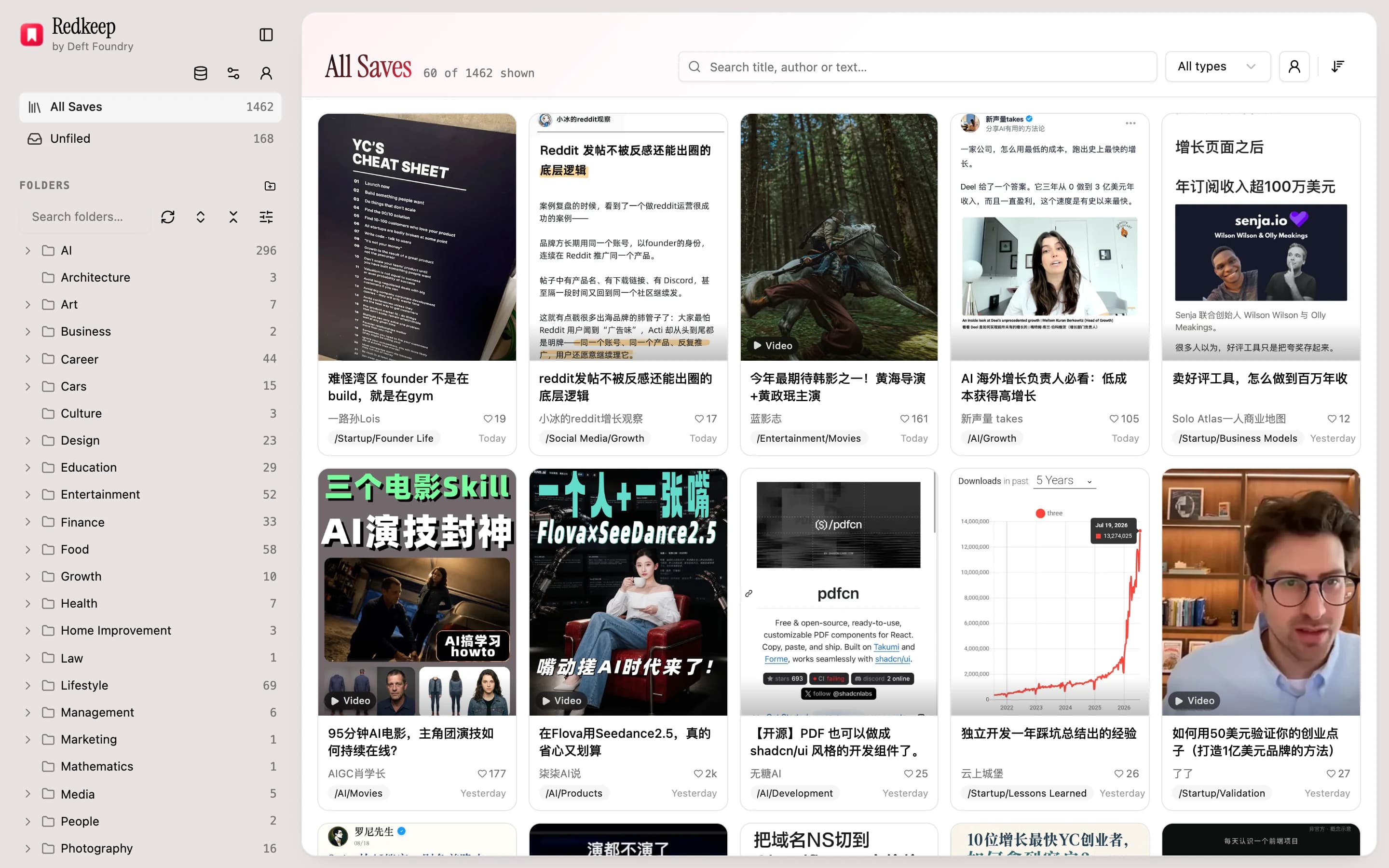
RedNote's saved posts pile up faster than its one-at-a-time album tool can sort them — a few thousand in and the backlog is unrecoverable. Redkeep pulls your whole collection into the browser and makes it searchable: titles, authors, covers, all indexed locally. Every other tool in this space stops at exporting; this one is about the part after that.
It's on the Chrome Web Store. The free tier is the whole tool and its library needs no account; the paid tier is bought once, if you want it.
- Price
- Account
- Chrome permissions
- Leaves your browser
- Surfaces
- Policy updated
How it works
It harvests in the background
Press start and the extension works through your saved posts a page at a time, in whatever budget RedNote's own rate limit allows — roughly forty pages in a burst, then about one a minute. It wakes on a timer rather than holding a progress bar, so closing the panel, closing the tab or restarting the browser costs nothing: it picks up where it stopped. A collection of about 1,900 posts is 188 pages, and the library is searchable from the first minute rather than the last.
You search and file it like a folder tree
Every title and author is indexed in the browser, so search answers as you type across the whole library. Build folders yourself, nest them, and file in batches — rubber-band a selection in the grid and move the lot in one pass — or let auto-filing propose the whole tree from your own titles and undo it in one click if you hate it.
You open the result back in RedNote
A result opens the real post in the tab you are already in. The index is a way back to your own collection, never a copy of it standing in for the thing.
What it does
All of this is the free tier. No account needed for any of it.
- Harvests your entire saved collection into the browser, a page at a time, around RedNote's own rate limits
- Full-text search across every saved title and author, instantly — the whole library is in memory
- Save or unsave a post inside RedNote and the library follows within seconds — no re-harvest, no stale rows
- Folders you build yourself: nest them, then rubber-band a batch in the grid and file the lot in one pass
- An organiser tab that browses the tree like a file manager: filter by author or media type, and search one folder or its whole subtree
- Opens any result back in RedNote, in the tab you are already in
- Back up the whole library to one JSON file, and import it on another machine
- None of this uploads anything: notes live in your browser's own storage and never touch a server of ours. Auto-filing is the one exception, it is opt-in, and it sends titles rather than notes
- No account needed for any of it — signing in unlocks auto-filing, and the first 200 notes of it are free
Who it's for
Install it if
- You save constantly on RedNote and have never once gone back and found something on purpose.
- Your saved collection is past a few hundred and the app's one-at-a-time album tool stopped being arithmetic you would ever do.
- You have tried an exporter, got a folder of JSON or a Notion database, and discovered that moving the pile did not sort it.
- You want the index on your own machine rather than in someone's cloud.
Skip it if
- You want your RedNote albums organised inside RedNote. Redkeep cannot do that, and the reason is below — it is a property of RedNote, not a missing feature.
- You want to download the images and videos themselves. This indexes what you saved; it is not a downloader.
- You want the same library on your phone. It lives in one browser profile, and moves between machines as a file you export and import.
What leaves your browser
The whole shelf is local-first, so this is the same figure on every sheet: what the extension holds, the line at the edge of your browser, and everything that gets across it.
Inside your browser
- Every post you saved — title, author, cover, id
- The folders you built, and which notes you filed where
- A cached copy of each cover, so it still renders after RedNote's own links expire
- How far the harvest has got, so it can pick up where it stopped
- Every search you type, and every result it gives back
- Your name, email, avatar and plan — only if you chose to sign in
4 things cross
Leaves your browser
- The titles in a batch being auto-filed
- Only if you turn auto-filing on. What crosses is the title, author name and media type of each note in the batch, plus the names of folders you already have. No post id, no body text, no cover and no link — the server answers by position in the batch, so it cannot reconstruct whose library it is looking at.
- Requests to RedNote itself
- Harvesting reads your collection from RedNote in the tab you are already signed in to, and covers come from its image servers. RedNote sees those requests the way it sees you browsing the site — nothing of yours is sent to it that it did not already have.
- Your Google profile picture
- Only if Google is how you signed in: your browser asks Google's image server for the avatar while a window is open. Nothing about your library goes with that request, and signing in by email instead draws your initial and asks Google for nothing.
- A check on whether you are signed in, and which extension you came from
- One request, to draw the account row and to know whether auto-filing is open to you. It carries your session cookie and nothing about your library. And when you press something here that opens one of our pages, the link says which extension you pressed it from — one word, so we can tell whether people reach the site through an extension or find it on their own. If that visit is where you create an account, that word is kept on the account; if you never sign in, the check answers no and nothing follows.
The exact version, clause by clause, is the privacy policy.
What it costs
$19once. No subscription — and buying this one never charges you for, or unlocks, anything else on the shelf.
- Auto-files your whole library into a folder tree built from your own titles — one level or two, decided per topic, reusing the folders it has already made
- Names those folders in Chinese or in English, whichever your saves are in — a separate choice from the language you read the extension in
- Undo the entire run in one click. Folders you made and notes you filed by hand are never touched
14-day refund on your first payment — no questions asked. Ask from Support.
See both tiersWhat it can't do
The boundaries worth knowing before you install, rather than after.
- It never writes anything back to RedNote
- RedNote's web version can read your albums and nothing else — creating, adding and managing them are app-only. So Redkeep cannot sort your saves into albums inside RedNote, and no extension can. What it builds is an index beside RedNote: from now on you find things here, not in the app. That trade is the product, and if it is not one you want, this is the paragraph to stop at.
- Not writing back is not the same as not keeping up
- The one-way rule is about what the extension does to your account, not about how current it is. Save or unsave a post yourself and the local library follows within seconds — no re-harvest, no stale rows.
- It needs a RedNote tab open while it harvests
- Your saved posts are only reachable from inside a signed-in RedNote page. Press start with no tab open and it opens one for you, because you just asked it to. When the timer wakes up and finds none, it pauses and says so rather than opening one behind your back — a background worker that opens pages on its own schedule is indistinguishable from something you would not install.
- One browser profile, and a file to move it
- The library is in your browser's own storage. There is no sync, no account holding your notes, and nothing to breach. Moving to another machine is an export and an import; removing the extension removes the library with it.
Questions
- Does anything I saved leave my browser?
- Not unless you turn on auto-filing. Harvesting reads your collection from RedNote itself, in the tab you are already signed in to; search, folders, filing by hand and backup never leave the browser at all, and no server of ours is involved in any of it. Auto-filing is the one exception, and what crosses is deliberately small: the title, author name and media type of the batch being filed, plus the names of folders you already have. No post id, no body text, no cover image, no link — the server answers by position in the batch, so it cannot reconstruct whose library it is looking at.
- Do I need an account?
- Not for anything the extension does in your browser, and that is the whole free tier. Signing in buys exactly one thing: auto-filing, which runs on our server and costs us money per run. A free account gets its first 200 notes filed before it is asked for anything. The paid tier has one limit of its own — a fair-use ceiling of 20,000 notes each calendar month, far past a personal library, resetting on the 1st — there to keep one payment honest against a feature that costs us money every time it runs.
- Why is the harvest slow?
- Because RedNote's saved-posts endpoint is metered per account: a burst of about forty pages after a rest, then a refill of roughly one page a minute. Hitting that ceiling is rate limiting, not a ban, and the extension treats it as the normal end of a round rather than a failure. Reloading the page does not reset the count and asking faster does not raise it — the limit is on the number of requests, not their spacing. So the design refuses to make you watch: it trickles in the background and the library is usable throughout.
- What does auto-filing actually decide?
- It reads a batch of titles and authors and answers which folder each one belongs in, reusing folders it has already made rather than inventing a synonym. It goes one level deep or two, decided per topic rather than always — a batch earns a sub-folder only when several notes in it would sit there. You choose whether the folder names come out in Chinese or English, separately from the language you read the extension in.
- Can I undo auto-filing?
- In one click, and the whole run at once. Folders you made yourself and notes you filed by hand are never touched by the undo or by the run — it only moves what it moved.
- Does it download my saved images and videos?
- No. It indexes what you saved — titles, authors, covers, ids — so you can find a post again and open it. The media stays where it is.
- What happens to my library if I uninstall it?
- It goes with the extension: Chrome deletes an extension's storage when it removes the extension. Export a backup first if you might want it — one JSON file, importable on another machine or after a reinstall.
Something else? Write to support — it is one person and a real inbox.
What it can reach
Every permission the extension asks Chrome for, and why. This is the same list a Chrome Web Store reviewer sees beside the manifest.
- Holds your harvested notes in the browser. Thousands of them is more than the default quota allows.
- Wakes the extension about once a minute to fetch the next page, and to work through an auto-filing run — so a long job survives the panel being closed. Both alarms are the extension's only timers.
- Runs one function inside your own signed-in RedNote tab to ask for the next page of saves. The site's API cannot be called from outside its own page.
- Opens the search panel down the side of the browser, so you can search your library without leaving the page you are on.
- Notices when you save or unsave a post on RedNote, so the local library stays in step without re-harvesting everything. It only watches the two RedNote domains, only reads the address of those two requests and the post ids inside an unsave, and never reads a response or changes a request.
- The two domains RedNote serves your collection from.
- Reads whether you are signed in to Deft Foundry, and — if you use auto-filing — sends that batch of titles for the model to sort. Everything else works signed out; no note ever leaves your browser for anything else.